🎨Custom Components
When the platform component library cannot meet the requirements, solve the problem by customizing the component or extending the component library.
📌Preface
- In actual form development, the component library of the low-code platform does not meet all needs.
- Microi Code provides two methods: Custom Components and Extended Component Library
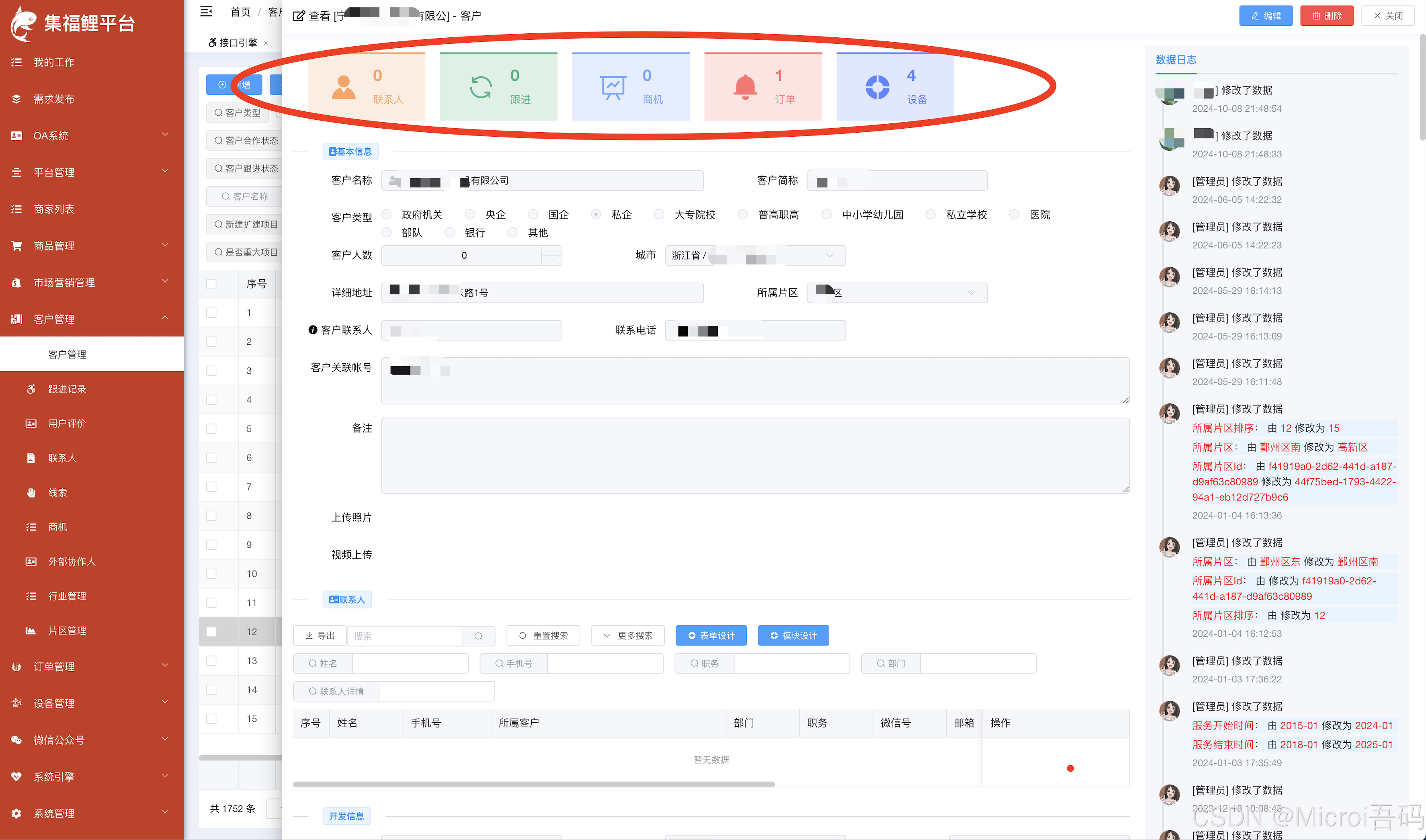
📸Example 1 (Custom Components)
Customer requirements: Data statistics are displayed at the top of the customer details, and each statistic is automatically scrolled to the corresponding sub-table position after clicking:
📸Example 2 (Custom Components)
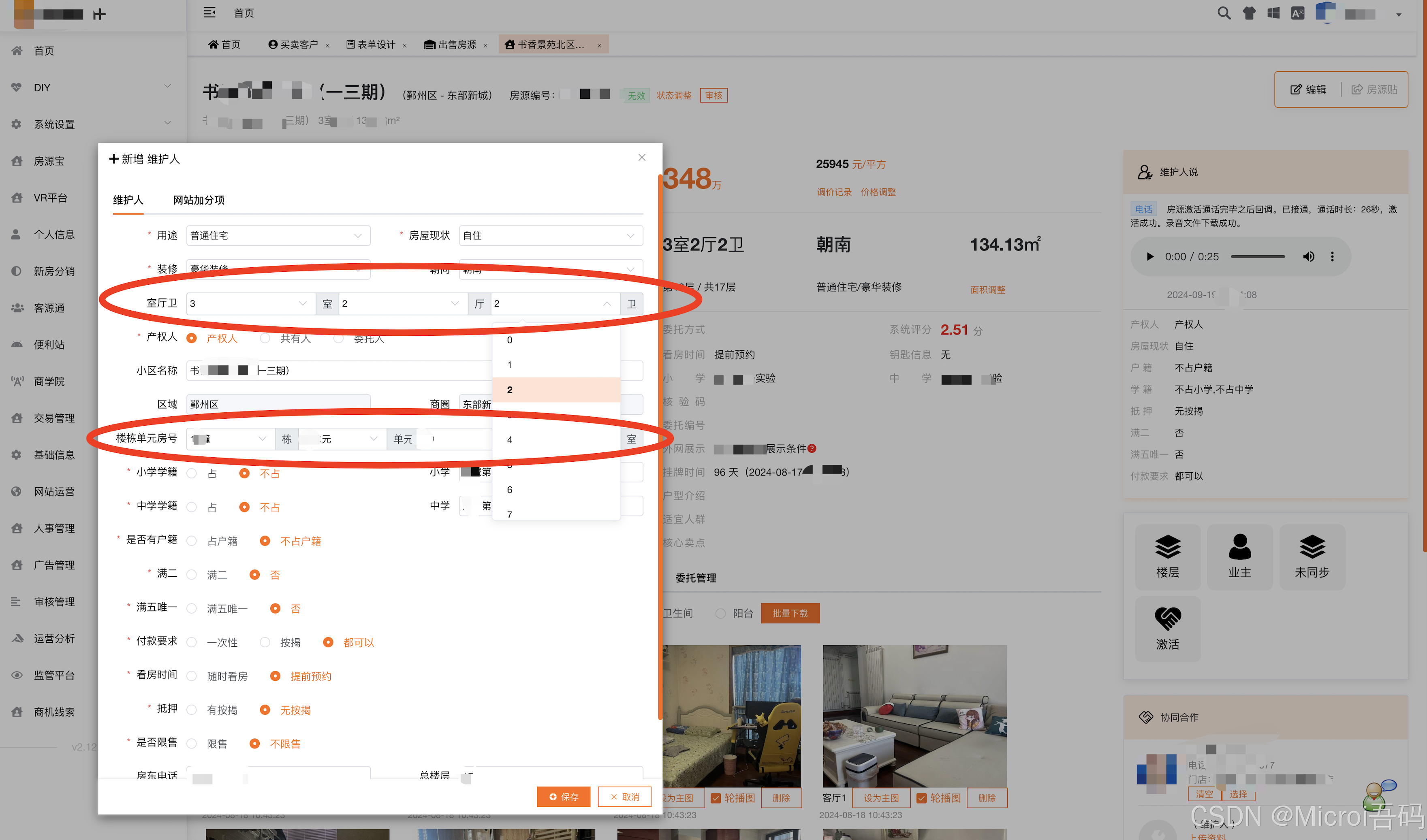
There are two special components to the listing information:
- Choose several rooms, several halls and several guards
- Obtain the building after selecting the community → Obtain the unit after selecting the building → Obtain the room number after selecting the unit
Implementation steps
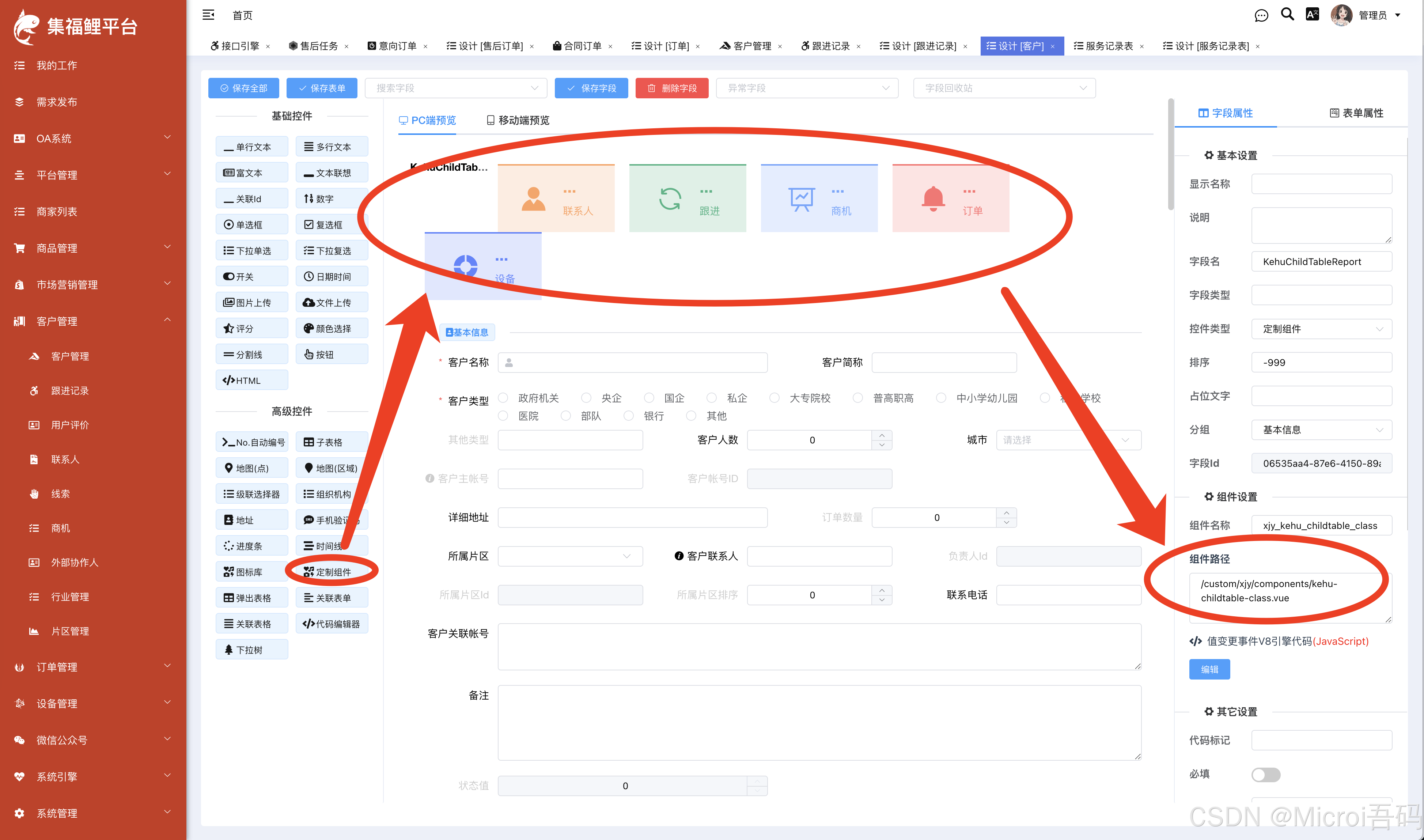
1. Create a custom vue component in the source code of Microi Code Framework
For example:/src/views/custom/xjy/components/kehu-childtable-class.vue
Expand to view the JavaScript code (160 lines)
javascript
<template>
    <div class="xjy-kehu-childtable-class">
        <div class="item" style="
                color: rgb(255, 163, 96);
                background: rgba(255, 163, 96, 0.2);
                border-top: 2px solid rgb(255, 163, 96);
            " @click="scrollIntoView('.field_LianxiRLine')">
            <i class="el-icon-s-custom"></i>
            <div class="info">
                <p>
                    <strong>{{ ReportData.LianxirenCount }}</strong>
                </p>
                <p>联系人</p>
            </div>
        </div>
        <div class="item" style="
                color: rgb(65, 181, 132);
                background: rgba(65, 181, 132, 0.2);
                border-top: 2px solid rgb(65, 181, 132);
            " @click="scrollIntoView('.field_GenjinJLLine')">
            <i class="el-icon-refresh"></i>
            <div class="info">
                <p>
                    <strong>{{ ReportData.GenjinCount }}</strong>
                </p>
                <p>跟进</p>
            </div>
        </div>
        <div class="item" style="
                color: rgb(113, 166, 255);
                background: rgba(113, 166, 255, 0.2);
                border-top: 2px solid rgb(113, 166, 255);
            " @click="scrollIntoView('.field_ShangjiLine')">
            <i class="el-icon-data-line"></i>
            <div class="info">
                <p>
                    <strong>{{ ReportData.ShangjiCount }}</strong>
                </p>
                <p>商机</p>
            </div>
        </div>
        <div class="item" style="
                color: rgb(255, 113, 113);
                background: rgba(255, 113, 113, 0.2);
                border-top: 2px solid rgb(255, 113, 113);
            " @click="scrollIntoView('.field_DingdanLB')">
            <i class="el-icon-message-solid"></i>
            <div class="info">
                <p>
                    <strong>{{ ReportData.DingdanCount }}</strong>
                </p>
                <p>订单</p>
            </div>
        </div>
        <div class="item" style="
                color: rgb(96, 130, 255);
                background: rgba(96, 130, 255, 0.2);
                border-top: 2px solid rgb(96, 130, 255);
            " @click="scrollIntoView('.field_Shebei')">
            <i class="el-icon-s-help"></i>
            <div class="info">
                <p>
                    <strong>{{ ReportData.ShebeiCount }}</strong>
                </p>
                <p>设备</p>
            </div>
        </div>
    </div>
</template>

<script>
export default {
    name: "loudong",
    props: {
        /**
         * 固定接收数据的对象,由V8代码传过来
         */
        DataAppend: {
            type: Object,
            default: () => { },
        },
    },
    watch: {
        //监听数据变化,切换小区时要重新获取楼栋,其它信息置空
        DataAppend: function (newVal, oldVal) {
            var self = this;
            self.KehuClassReport();
        },
    },
    data() {
        return {
            ReportData: {
                LianxirenCount: "...",
                GenjinCount: "...",
                ShangjiCount: "...",
                ShebeiCount: "...",
                DingdanCount: "...",
            },
        };
    },
    mounted() {
        var self = this;
        self.KehuClassReport();
    },
    methods: {
        KehuClassReport() {
            var self = this;
            if (self.DataAppend.KehuID) {
                self.Microi.DataSourceEngine.Run(
                    "kehu_childtable_report",
                    {
                        Id: self.DataAppend.KehuID,
                    },
                    function (result) {
                        if (self.Microi.CheckResult(result)) {
                            self.ReportData = result.Data;
                        }
                    }
                );
            }
        },
        scrollIntoView(traget) {
            const tragetElem = document.querySelector(traget);
            const tragetElemPostition = tragetElem.offsetTop;
            // 判断是否支持新特性
            if (
                typeof window.getComputedStyle(document.body).scrollBehavior ==
                "undefined"
            ) {
                // 当前滚动高度
                let scrollTop =
                    document.documentElement.scrollTop ||
                    document.body.scrollTop;
                // 滚动step方法
                const step = function () {
                    // 距离目标滚动距离
                    let distance = tragetElemPostition - scrollTop;

                    // 目标需要滚动的距离,也就是只走全部距离的五分之一
                    scrollTop = scrollTop + distance / 5;
                    if (Math.abs(distance) < 1) {
                        window.scrollTo(0, tragetElemPostition);
                    } else {
                        window.scrollTo(0, scrollTop);
                        setTimeout(step, 20);
                    }
                };
                step();
            } else {
                tragetElem.scrollIntoView({
                    behavior: "smooth",
                    inline: "nearest",
                });
            }
        },
    },
};
</script>
<style lang="scss">
</style>2. Drag the form design into a [Custom Component] and fill in the component path