
⚙Interface Engine
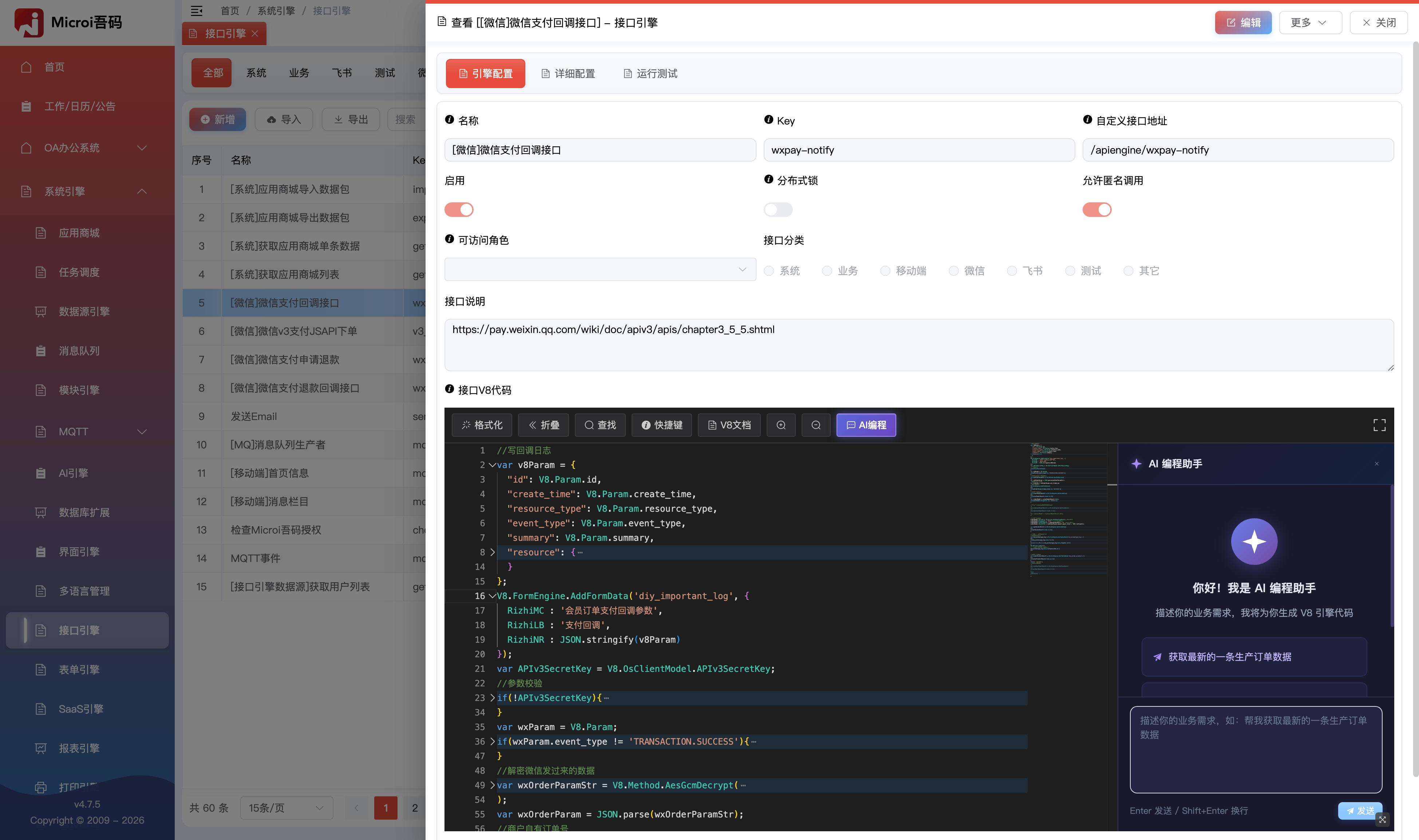
It takes only 1 minute to write an interface to obtain data, and the API interface JavaScript written online is used, and the saving will take effect.
📌Introduction
- As one of the biggest highlights of the platform, the interface engine mainly solves complex business logic and uniformly manages custom interfaces.
- Use JavaScript to write API interface online, support AI programming
- Support
Get/PostRequest, return JSON, string, file, HTML, etc. - Support custom interface addresses, distributed locks, permissions, custom extension functions, etc.
- Extreme performance (V8 code pre-compilation, multi-level cache) and development efficiency without local compilation and release
- After more than 8 years of successful case verification, some projects up to 500 interface
Related Documentation
js
//获取一个数据列表
var result = V8.FormEngine.GetTableData('tableName', {
  _Where : [ // WHERE GuanLianID = 1 OR GuanLianID IS NULL
    ['GuanLianID', '=', '1'],
    ['OR', 'GuanLianID', '=', null]
  ],
  _PageIndex : 1,
  _PageSize : 15,
});
return result;Powerful V8 debugging capabilities
- Support
本地、在线Two ways to write V8 interface engine,双向增量同步Online, local V8 code- Support
本地调试V8事件代码、接口引擎代码and supports V8 code calls平台插件源码Associated Debugging- 整个接口请求全路径支持
断点调试:1.
前端Form entry V8 event[支持调试]2.前端V8 event before form submission[支持调试]3.后端V8 event before form submission[支持调试]4.'Backend' V8 Event Invoke Interface Engine[支持调试]5.'Backend' interface engine call 'V8.Cache'Any back-end plug-in source code such[支持调试]6.后端V8 event after form submission[支持调试]7.前端V8 event after form submission[支持调试]
Supports all backend V8 functions
- See platform documentation:V8 function-backend
Support for 'Get', 'Post' requests
- Whether you are through
getStillpost, can successfully request the interface engine
Support for 'Form', 'Json' requests
- Whatever your request is
form-dataStillpayload-json, all supported
V8.Param
- can receive and access
form、json、urlthree parameters
javascript
//支持接收3种类型的参数,均使用V8.Param.***访问
var id = V8.Param.Id;Execute code asynchronously
- Open a new thread to execute V8 code asynchronously. System For more use see:V8 Function List-Backend-System
js
//方法1(推荐)
var timer1 = setTimeout(function() {
    V8.FormEngine.UptFormData('diy_test1', {
      Id : '8007f94b-4883-4a0c-8c23-f25aca910722'
      Text45 : '2222',
    });
}, 1000);
//可在timer1开始执行前随时手动提前终止定时执行
clearTimeout(timer1);

//方法2
System.Threading.Tasks.Task.Run(function(){
  //实现setTimeout(function, 1000)的效果,不加则是setTimeout(function, 0)的异步效果
  System.Threading.Thread.Sleep(1000);
  V8.FormEngine.UptFormData('diy_test1', {
    Id : '8007f94b-4883-4a0c-8c23-f25aca910722'
    Text45 : '2222',
  });
});Extended Interface Engine
- See [
Microi.V8Engine](https://gitee.com/ITdos/microi.net/tree/master/Microi. Server/Microi.V8Engine) class library, inV8EngineExtendclass
Expand to view JavaScript code (40 lines)
js
using System;
using Dos.Common;
using Microi.Model.Aliyun;
namespace Microi.net
{
    public partial class V8EngineExtend
    {
        /// <summary>
        /// 这种方式支持。测试扩展V8.TestV8Extend3('test')方法
        /// </summary>
        /// <returns></returns>
        public string TestV8Extend3(string testParam)
        {
            return "TestV8Extend3:" + testParam;
        }
        /// <summary>
        /// 新增V8.Alipay对象。
        /// 这种方式支持V8.Alipay.Test22('test'),也支持V8.Alipay.CreatePay({ AppId : '11' })
        /// </summary>
        public Alipay Alipay
        {
            get { return new Alipay(); }
        }
        /// <summary>
        /// 新增V8.WeChat对象。
        /// </summary>
        public WeChat WeChat
        {
            get { return new WeChat(); }
        }
        public AlipayV3 AlipayV3
        {
            get { return new AlipayV3(); }
        }
        public Alidns Alidns
        {
            get { return new Alidns(); }
        }
    }
}Return data
- Return data to the front end, which can be JSON, string, Html, file, etc.
Expand to view JavaScript code (38 lines)
javascript
//当指定了Code值为1时,平台会自动提交事务,无需手动执行V8.DbTrans.Commit()
return { Code : 1, Data : [1, 2, 3], Msg : '事务已提交!' };

//若代码出现return,并且未指定Code的值、或Code值不等于1时,则会自动回滚事务,无需手动执行V8.DbTrans.Rollback()
return { Code : 0, Msg : '错误信息,事务已回滚!' };

//若代码出现return,并且未指定Code值(平台识别到非{Code:1}结构时自动回滚事务)
//【注意】禁止手动调用V8.DbTrans.Commit()或V8.DbTrans.Rollback(),事务生命周期由平台统一管理
return { A : 111, B : 222 };

//支持返回JSON
return [{ Id : 1, Name : '张三' }];

return '支持返回字符串';

//支持返回HTML
return `<html>
          <body>
            <h1>支持返回HTML</h1>
          </body>
        </html>`;

//支持直接响应文件,如:图片、Office文档等等
var downResult = V8.Http.GetResponse({
  Url : 'https://static.itdos.com/itdos/img/20230623/WechatIMG21753.png'
});
var imgByte = downResult.RawBytes;
V8.Result = {
  Code : 1,
  Data : {
    FileName : '接口引擎直接返回响应文件.png',
    ContentType : 'image/png',
    FileByteBase64 : System.Convert.ToBase64String(imgByte)
  }
};

//旧版返回方式(仍然支持,但建议弃用这种方式)
//V8.Result = { Code : 1, Data : [] }Interface Configuration
Basic Configuration
- Name (
ApiName) Customization, such as: [Mobile] to obtain a list of goods- Key (
ApiEngineKey) Customization, such as: get-product-list- Prohibit external calls (
StopHttp), after opening, this interface (function) can only be called through the interface engine V8 code or the server-side V8 event, and the custom interface address is invalid
Custom Interface Address
- custom interface address (
ApiAddress), it is recommended to use uniformly/apiengine/Beginning, such:/apiengine/get-product-list。 Of course you want to customize it/api111/b2222/c333/d444You can also useApiBase + ApiAddressAccess Interface
distributed lock
- For interfaces in some scenarios, distributed locks must be used, such as deducting inventory after order shipment approval to prevent inventory from becoming negative. (Of course, you can also use message queues, which are explained in other articles)
- opening a distributed lock can set a distributed lock Key, which is very useful. For example, when we want to increase or decrease the inventory of commodity a, the distributed lock Key can be set to the Id of commodity a. at this time, different commodities go to different distributed lock keys and line up in different teams, thus greatly improving the concurrent throughput.
- if the distributed lock Key is not set, then 1000 people who call this interface at the same time will have to queue up.
Allow anonymous calls
- the interface engine must pass in token by default to be called, otherwise it will report an error 1001 not logged in
- When allowing anonymous calls is enabled, there is no need to pass in token, but note that access V8.CurrentUser in V8 engine is {}
Response File
the test access interface engine address will download the picture directly:https://api.itdos.com/apiengine/test_response_file?OsClient=iTdos
javascript
var downResult = V8.Http.GetResponse({
  Url : 'https://static.itdos.com/itdos/img/20230623/WechatIMG21753.png'
});
var imgByte = downResult.RawBytes;
return {
  Code : 1,
  Data : {
    FileName : '测试响应文件.png',
    ContentType : 'image/png',
    FileByteBase64 : System.Convert.ToBase64String(imgByte)
  }
};API testing
Interface Engine form provides the ability for the interface to run tests (driven by the form engine)
interface debugging
- Define whether the log content needs to be output to the front end: [var isDebugLog = true;];]
- Define the log content to be output to the front end: [var debugLog = {};];]
- Record log: [debugLog.Log1 = list1Result;];]. You can also use [V8.Method.AddSysLog] to write the MongoDB log, and then view it in System Settings-> System Log
- judge whether to output the log to the front end: [DataAppend: { DebugLog : isDebugLog ? debugLog: null}]]
Expand to view JavaScript code (41 lines)
js
//【第一步】定义是否需要向前端输出日志内容,需要调试时为true,不需要调试时为false
var isDebugLog = true;//也可以使用系统设置全局变量:var isDebugLog = V8.SysConfig.V8EngineDebugLog;
//【第二步】定义需要向前端输出的日志内容
var debugLog = {};
//获取业务数据
var list1Result = V8.FormEngineGetTableData({
    FormEngineKey: 'test1',
    _Where: [
      ['field1', '=', '1']
    ]
});
//【记录日志】测试记录日志1
debugLog.Log1 = list1Result;
//【记录日志】【写MongoDB日志】
if(isDebugLog){
  V8.Method.AddSysLog({
    Type : '日志类型',
    Title : '日志标题',
    Content: `日志内容:${JSON.stringify(list1Result)}`
  });
}
if(list1Result.Code != 1){
  return list1Result;
}
//处理业务数据
debugLog.Log2 = [];
for(var i = 0; i < list1Result.Data.length; i++){
    var item = list1Result.Data[i];
    if(item.Number < 10){
        item.Number = '0' + item.Number;
        //【记录日志】测试记录日志2
        debugLog.Log2.push(item.Id);
    }
}
return {
    Code : 1,
    Data : null,
    DataAppend : {
        DebugLog : isDebugLog ? debugLog : null // 【第三步】判断是否向前端输出日志
    }
};Catch interface code exceptions
Expand to view JavaScript code (29 lines)
js
try{
  //你的接口引擎代码
}catch (error) {
    debugLog.errorDetails = {
        message: error.message || '',
        toString: error.toString ? error.toString() : '',
        stack: error.stack || '',
        lineNumber: error.lineNumber || '',
        columnNumber: error.columnNumber || '',
        fileName: error.fileName || '',
        name: error.name || '',
        description: error.description || ''
    };

    var errorMsg = '接口引擎的V8代码执行发生异常:' + (error.message || error.toString());
    if (error.lineNumber) {
        errorMsg += ' (行号: ' + error.lineNumber + ')';
    }
    if (error.stack) {
        errorMsg += '\n堆栈: ' + error.stack;
    }
    return {
        Code: 0,
        Msg: errorMsg,
        DataAppend: {
            DebugLog: isDebug ? debugLog : null
        }
    };
}Interface Engine Actual Combat
- here we will release a large number of interface engines to realize complex function combat: interface engine combat
Precautions
- if a parameter passed in by the front end is an array, when V8.Param of the interface engine receives the parameter, it is also an array and can use all the features of the array, but it cannot be used
Array.isArray(V8.Param.ArrayParamName)to judge as true
js
var arrayValue = V8.Param.ArrayParamName;
var isArray = Array.isArray(arrayValue);  //值为 false
var isObject = typeof(arrayValue) == 'object';  //值为 true
var id1 = arrayValue[0].Id;  //可以正常使用
var hasValue = arrayValue.length > 0;  //可以正常使用