
📦Template engine
Used to process the final rendered data, such as displaying a different colored background based on field values
📌Introduction
模板引擎Currently applied in表单属性in 【表格 V8 模板引擎】、【表单 V8 模板引擎]:
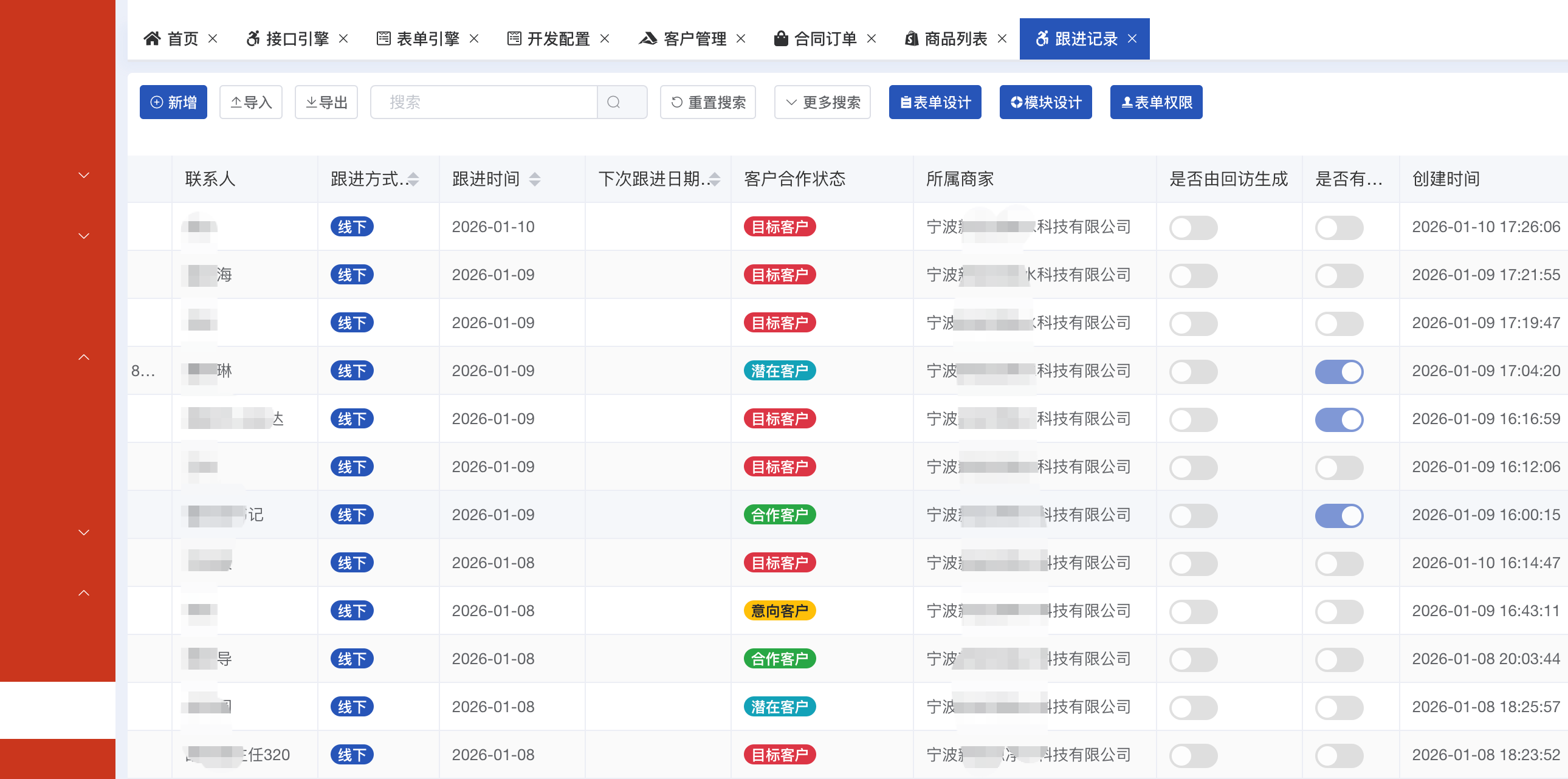
💡Example
Note
Here'sV8.FormYou can only access the value of the Query Column field configured in Module Engine. If the query column is set to null, you can access all the field values.
Expand to view JavaScript code (28 lines)
js
//使用bootstrap样式
var value = V8.Form.Zhuangtai;
if(V8.IsNull(value)){
    V8.Result = '';
}else{
    var classStr = 'badge-primary';
    if(value == '禁用'){
        classStr = `badge-danger`;
    }
    else if(value == '未通过'){
        classStr = `badge-warning`;
    }
    else if(value == '待审核'){
        classStr = `badge-info`;
    }
    var html = `<span class="badge badge-pill ${classStr}">${value}</span>`;
    V8.Result = html;
}

//使用style
if(V8.Form.XuqiuLX == '合并'){
  V8.Result = `<span style="color:blue;">${V8.Form.XuqiuDDH}</span>`;//显示蓝色
}
else if(V8.Form.HebingID){
  V8.Result = `<span style="color:#999;">${V8.Form.XuqiuDDH}</span>`;//显示灰色
}else{
  V8.Result = V8.Form.XuqiuDDH;//默认
}Support 'bootstrap', 'element-ui style
Commonly usedbootstrapStyle: 
html
<span class="badge badge-primary">Primary</span>
<span class="badge badge-secondary">Secondary</span>
<span class="badge badge-success">Success</span>
<span class="badge badge-danger">Danger</span>
<span class="badge badge-warning">Warning</span>
<span class="badge badge-info">Info</span>
<span class="badge badge-light">Light</span>
<span class="badge badge-dark">Dark</span>Single picture list display
js
var html = '';
var fileServer = V8.SysConfig.FileServer;
if(!V8.IsNull(V8.Form.GongsiLOGO)){
  html = `<image src="${fileServer + V8.Form.GongsiLOGO}"
                  mode="widthfix"
                  style="height:40px;width:40px;object-fit: cover;margin-top:5px;margin-bottom:5px;" / >`;
}
V8.Result = html;Multiple picture list display
js
var html = '';
var fileServer = V8.SysConfig.FileServer;
if(!V8.IsNull(V8.Form.TupianMS) && V8.Form.TupianMS.indexOf('[')!=-1){
var TupianMS = JSON.parse(V8.Form.TupianMS)
TupianMS.forEach(item=>{
//html = html + `<img src="${fileServer + item.Path}" style="width:40px;height:40px;object-fit: cover;margin-top:5px;margin-bottom:5px;" / >`;
html = html + `<div class="img-container">
<img onclick="window.open('${fileServer + item.Path}')"
class="small-img" src="${fileServer + item.Path}"
style="width:50px;height:40px;object-fit: cover;margin-top:2px;margin-bottom:2px;margin-left:5px;">
<div class="overlay" style="top:-200px;z-inde:99999">
<img class="large-img" src="${fileServer + item.Path}">
</div>
</div>`
})
html = `<view style="display:flex;align-items: center;justify-content: flex-start;">` + html + `</view>`
}
V8.Result = html;Link redirection
js
if(V8.Form.SuoshuKH && V8.Form.SuoshuKH.KehuMC){
  V8.Result = `<a href="/#/kehu?FormDataId=${V8.Form.KehuID}" target="_blank">${V8.Form.SuoshuKH.KehuMC}</a>`;
}